Q2 2026 Update: Mobile App, Tier Groups, Paysafecard & More
The PayNow mobile app enters beta, Tier Groups go live, Paysafecard opens for applications, and the checkout now speaks 9+ languages. Here's everything that shipped in Q2.
The PayNow Mobile App Is Here (Beta)
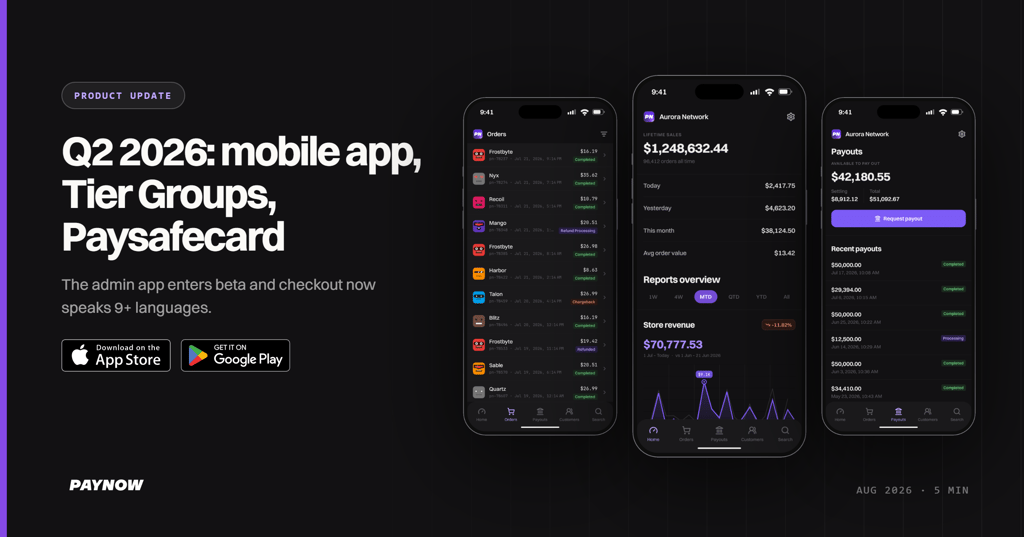
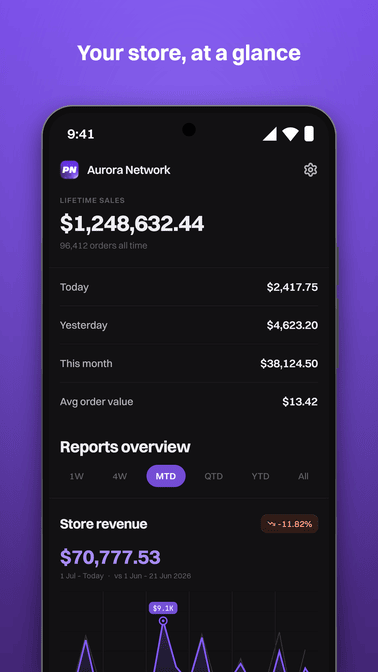
The PayNow mobile app is now in beta on iOS and Android. It's a simplified version of the dashboard built for the things you actually need on the go: checking your stats, refunding customers, assigning packages, and requesting payouts.
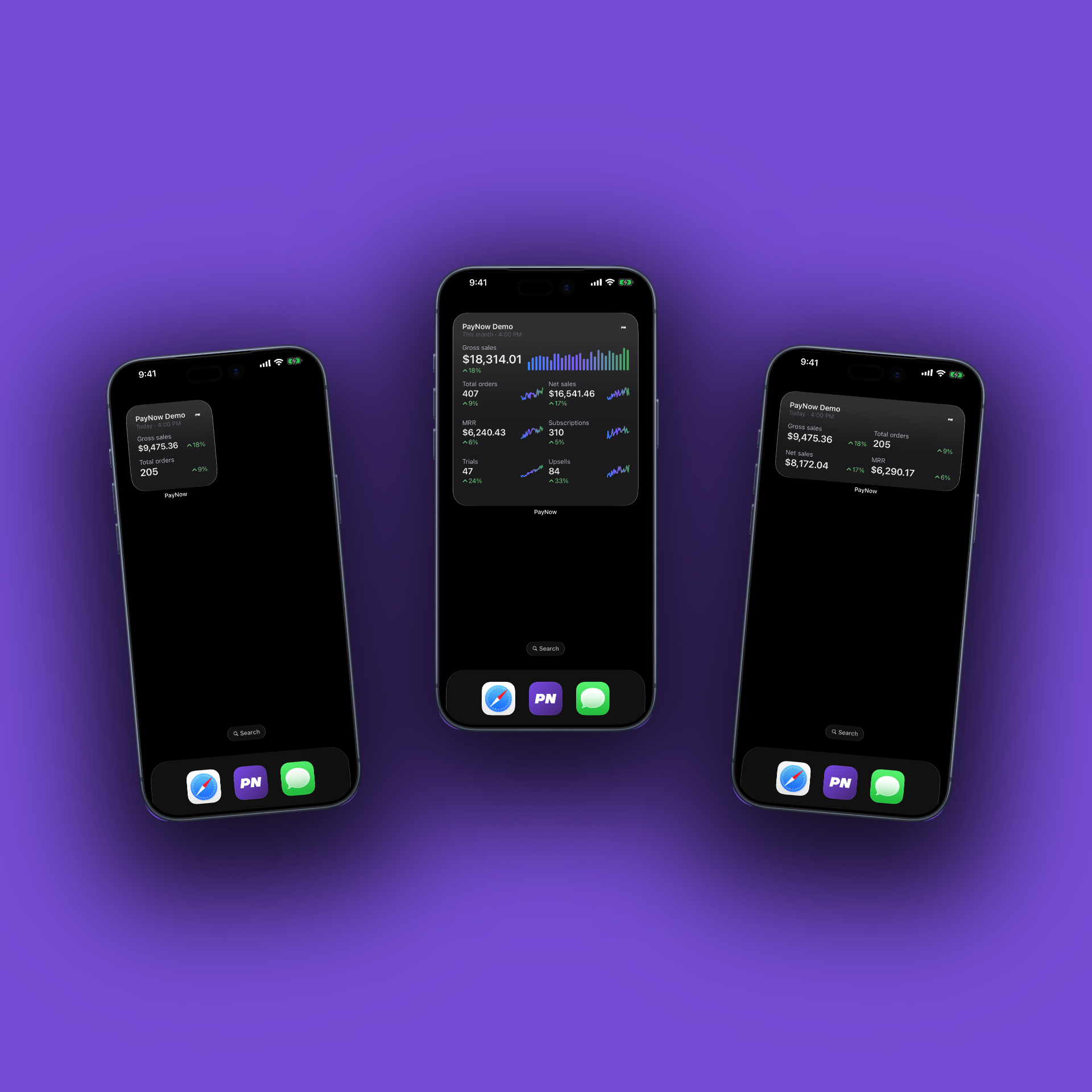
Home screen widgets are already available for testing on iOS. Pick a size and keep gross sales, orders, net sales, MRR, subscriptions, trials, and upsells on your home screen without opening the app. Payment notifications are next on the list.
Get it here:
- Android: https://play.google.com/store/apps/details?id=gg.paynow.app
- iOS: https://testflight.apple.com/join/MNyqXvdr (you'll need Apple's TestFlight app from the App Store first)
One note for Android: passkeys don't work in the Android app yet. If a passkey is the only 2FA on your account, add an authenticator app on the web dashboard first or you won't be able to log in. iOS handles passkeys fine.
It's a beta, so we're looking for feedback – there's a dedicated #mobile-app-feedback channel in our Discord.
Tier Groups: Upgrades and Downgrades Without the Hassle
Tier Groups are live. Group your products into a ranked ladder, and customers who already own a lower tier only pay the difference when upgrading. Works for both subscriptions and one-time purchases, across all game types including Minecraft.
For subscriptions:
- Upgrades apply immediately and the customer is charged the prorated difference for the rest of the billing period
- Downgrades are scheduled for the next renewal – the customer keeps their current tier until then
- Pending tier changes are visible to the customer in the storefront
For one-time purchases:
- Cumulative pricing – if a customer already bought Bronze and wants Gold, they only pay the difference
- No separate upgrade products, no doing the math yourself
The tier ladder is ordered by price automatically. Create a tier group, assign your products to it, and the upgrade/downgrade logic handles itself.
One security detail: for stores where customers sign in with just a username or IGN (no Steam auth), we require email verification before a tier change goes through. This prevents someone who knows a player's name from messing with their subscription. Stores using Steam login skip this step since the identity is already verified.
The Summit template supports tier groups out of the box. If you're running a custom storefront, you'll need to implement the upgrade/downgrade flows yourself using the storefront API: https://docs.paynow.gg/storefront-headless/storefront-api/tier-groups
Available on all plans, Free and up.
Checkout Localization Is Live
The PayNow checkout now automatically localizes into 9+ major languages, with more on the way. A customer in Prague sees the checkout in Czech, a customer in Paris sees it in French – no configuration needed on your end. Combined with Adaptive Currency and regional payment methods, the checkout now adapts to wherever your customers are.
Paysafecard Applications Are Open
We said it was on its way – Paysafecard applications are now open. Head to Store → Settings → Payment Methods and click on Paysafecard to submit your application.
Paysafecard requires a review of your store by Paysafe before it can be enabled. Make sure your store meets these requirements before applying:
- At least $100 USD (or equivalent) processed in the last month
- A fully functional store – no "under construction" or "coming soon" content
- All products clearly described, providing tangible benefits
- No donation-only products without benefits
- PayNow clearly stated as the Merchant of Record in your website footer, including links to the PayNow Terms and Privacy Policy
Paysafe reviews take around 2–3 weeks, and we'll notify you of the decision either way.
More Control Over Affiliate Commissions
Affiliates and creator codes now support commission steps for subscription renewals. Instead of one flat rate, you can set a different percentage for the initial purchase and each renewal – say 10% on the first purchase, 20% on the first renewal, and 30% from the second renewal onward.
This lets you reward affiliates for bringing in subscribers who actually stick around, rather than paying the same rate for a one-month customer and a twelve-month one.
Platform Stability & Backend Improvements
A lot of this quarter went into work you won't see in a changelog. We cleaned up technical debt and improved the reliability of core systems: checkout, pricing, orders, storefront, subscriptions, and email flows. We also improved payment routing, integrated new payment processors, and worked on payment acceptance rates across the board.
Less visible than new features, but it makes everything you and your customers touch faster and more reliable.
Smaller Improvements
- Adaptive Currency now supports AUD and CAD, as promised in the last update
- Added Bizum, a popular payment method in Spain
- Apple Pay now shows on non-macOS machines too. If you use the iframe embed, it requires a domain whitelist – open a ticket and we'll set it up
- Promo codes can now be stacked at checkout. Disabled by default – enable it under Settings → Payment Settings
- Sales can now apply to a set number of subscription renewals, not just the first payment
- Coupons support discounts across multiple renewals instead of hardcoded months, and customers are emailed with updated pricing before their next renewal if a discount no longer applies
- Optimized Pay by Bank routing in some regions
- Discord webhooks now support a plain message (text) format in addition to embeds
- Added new product tax codes: IaaS, PaaS, SaaS – Security, and SaaS – Storage
- Tebex template compatibility improvements
Up Next in Q3
Dashboard redesign – the new dashboard is getting close, with a public beta planned in the next month or two. New UI, fresh look, and a round of bug fixes across the store management experience.
Email customization – customize the emails PayNow sends to your customers. Entering public testing soon.
Payment notifications – push notifications in the mobile app, so you know the moment an order lands.
More checkout languages – expanding localization coverage beyond the current set.
If you're not yet on PayNow, you can get started at paynow.gg. Documentation is at docs.paynow.gg, and we're always available in Discord if you have questions.
m0uka
We build payments, tax and checkout for game servers and software companies. Questions about your setup? See pricing.
Sell as Merchant of Record
Plans from $0. Platform fees as low as 2.5%, charged after the gateway fee.
Get started free